
“A website, and to actually be found on it.”
Nick Gardener · Groundforce1- A new site on his own address, written for what his customers search
- Google work every week, not a one-off check
You built the app. FlutterFlow still wants $39 a month to put it in the App Store, and every grey screen eats an evening. Bring the code here. It ships to the stores from your own repo, and gets the website, emails and posts it never had.
Keep FlutterFlow while you try us. Cancel once your app has gone to the stores from FlexOS.
Reads what is published · nothing changes
Four things. The pictures are FlutterFlow’s own, so it looks exactly like what you’ll see.
In FlutterFlow: the </> button at the top right › Download Code.
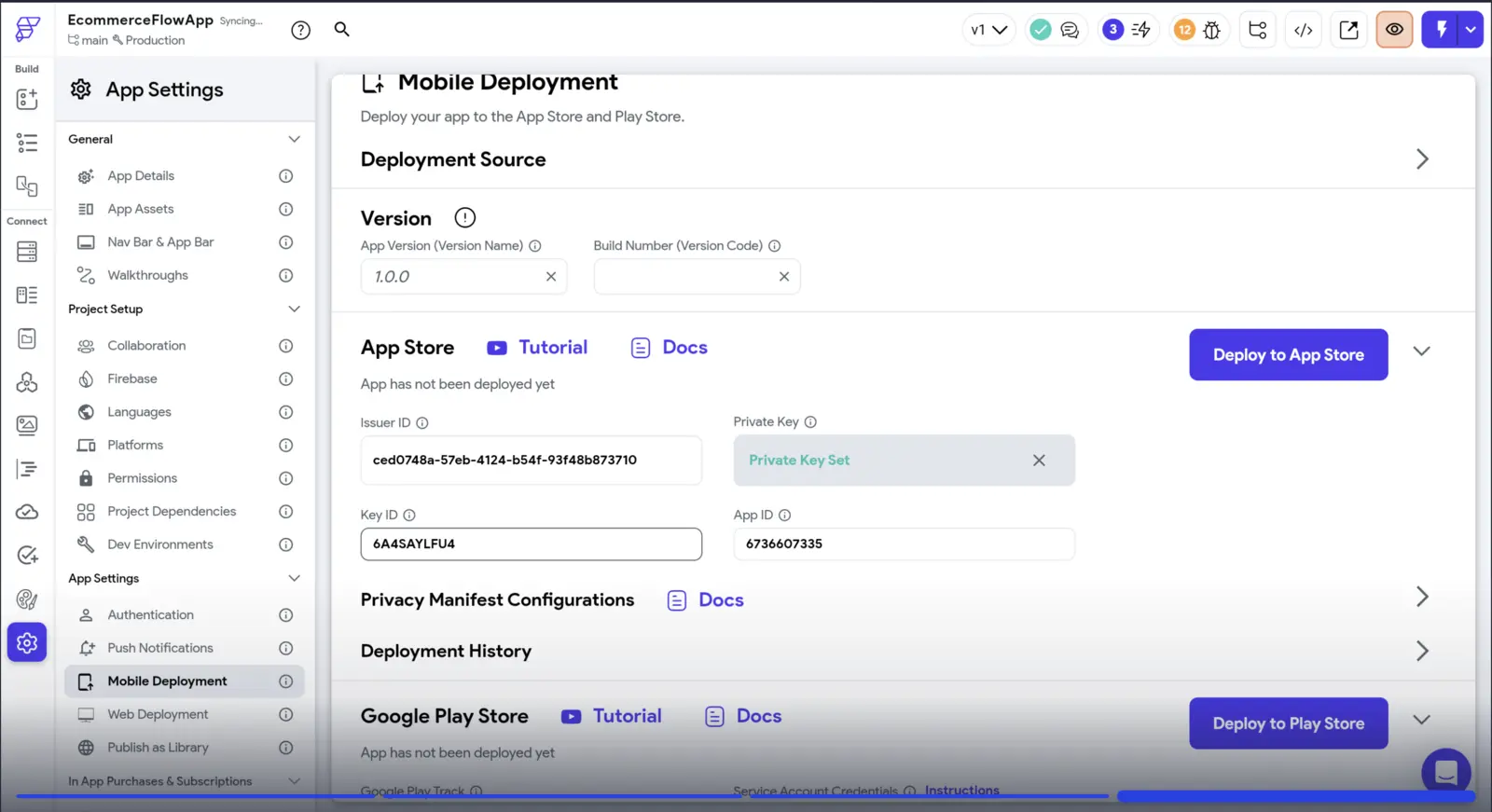
Settings & Integrations › App Settings › Mobile Deployment › Google Play Store.
Grab this before you cancel. Lose it and you can never update your Android app again.
App Store Connect › Users and Access › Integrations › Team Keys. Click through it:
The .p8 downloads once. The Key ID is beside it, the Issuer ID at the top.
FlutterFlow’s video of the whole thing →Google Cloud › Service accounts › Manage keys › Add key › JSON. Watch it:
FlutterFlow’s video of the whole thing →The zipKeystore + passwordApple .p8Key IDIssuer IDPlay .json
That’s everything. Drop the zip in the box above; the keys go in your Vault.
What it does today.
Say what you want like you’d tell a friend. Voice notes are fine. No more hours clicking through panels.
A grey screen is one bad line of code. Flexi finds it, fixes it and shows you the change.
Your Apple and Google keys go in the Vault, never in the code.
The app never had one. Flexi builds it on your own address, written for what people search.
One month of FlutterFlow Basic ($39) lets you download the code. From that day, it’s yours.
Drop the zip above. It goes into your own repo exactly as it is, and your keys go in the Vault, never in the code.
Flexi builds the website people find, plus the emails and posts. Sending new versions to the stores from FlexOS is coming; until then, FlutterFlow does that part.
| What | FlutterFlow | FlexOS |
|---|---|---|
| To put it in the stores | $39 a month on Basic, for as long as you ship updates. | Coming: a store build from FlexOS with the keys you already have. Until then, keep shipping from FlutterFlow. |
| When it breaks | A grey screen, the docs and a forum thread. | Flexi finds the broken line and fixes it. Or a flexpert who’s shipped FlutterFlow apps does. |
| Your code | Downloadable from Basic ($39); pushed to GitHub from Growth ($80). | Yours, in your own repo, from day one. Leave whenever you like. |
| What you pay for | From $39 a month for one seat with code download; $80 with GitHub. | $40 a month to start, $80 for the latest AI models, $200 for up to 5 projects. No top-ups. |
| What you get | An app, built by you, screen by screen. | Your app, plus the website, emails, posts and follow-ups, built by Flexi around it. |
FlutterFlow’s side is its own pricing page, flutterflow.io/pricing, read on 25 September 2026. If it has changed, tell us and this changes.
Four real customers, what they asked for, and what Flexi built.
“A website, and to actually be found on it.”
Nick Gardener · Groundforce1
“Better leads for kitchen refurbs.”
Michal · Time to Refurbish
“The posting, off my plate.”
Joey · Gorilla Asphalt
“More customers, and the emails actually sent.”
Yaser · Yaser UKKeep it for now: sending your app to the App Store and Google Play from FlexOS is coming, and until then FlutterFlow does that part. Your code lives in your own repo, and Flexi makes the changes there.
A grey screen is a widget that crashed. Here your app is code Flexi can read, so he finds the line, fixes it and ships the fix. No forum thread required.
Yes. Bring the zip from Download Code: it goes into your own repo as it is, with the keys in your Vault. Then FlexOS ships it to TestFlight and Google Play’s internal testing with your own store keys. Apple needs the app in App Store Connect first, and Google wants the very first upload done by hand in Play Console. Until then, your app keeps running where it is.
$80 a month to keep building your app with Flexi, everything included. $40 a month if you only want the agents, for your posts and emails. No top-ups.
Because nobody finds an app on its own. They find a website, read a post, get an email back. FlutterFlow never did that part. Flexi does.